
The smartest move you can make as a creator is to verify once, share only what each platform requires, and anchor that verified identity to a single canonical source you control. Services like Stripe Identity can confirm your identity quickly, W3C Verifiable Credentials let you present a single signed proof across multiple platforms, and Sidenty’s specialist team handles takedowns and legal escalation when impersonation gets out of hand.
Your immediate action list:
- Create a canonical anchor. Register a personal domain or designate one stable profile that all your other accounts link back to.
- Issue a portable credential. Use a W3C Verifiable Credential or the Digital Credentials API to store a signed proof in a digital wallet.
- Enable liveness checks where required. For payout onboarding on platforms like OnlyFans or Twitch, liveness verification confirms you are a real, present person, not a deepfake.
- Build an evidence-preservation template now. Before anything goes wrong, set up a folder structure for URLs, screenshots, timestamps, and metadata so you can act fast if impersonation hits.
Understanding your identity verification options before a crisis is what separates creators who recover quickly from those who spend months in damage control.
Table of Contents
- How do platforms actually verify your identity?
- Can you verify once and reuse that trust across services?
- How do you prove what platforms need without exposing raw documents?
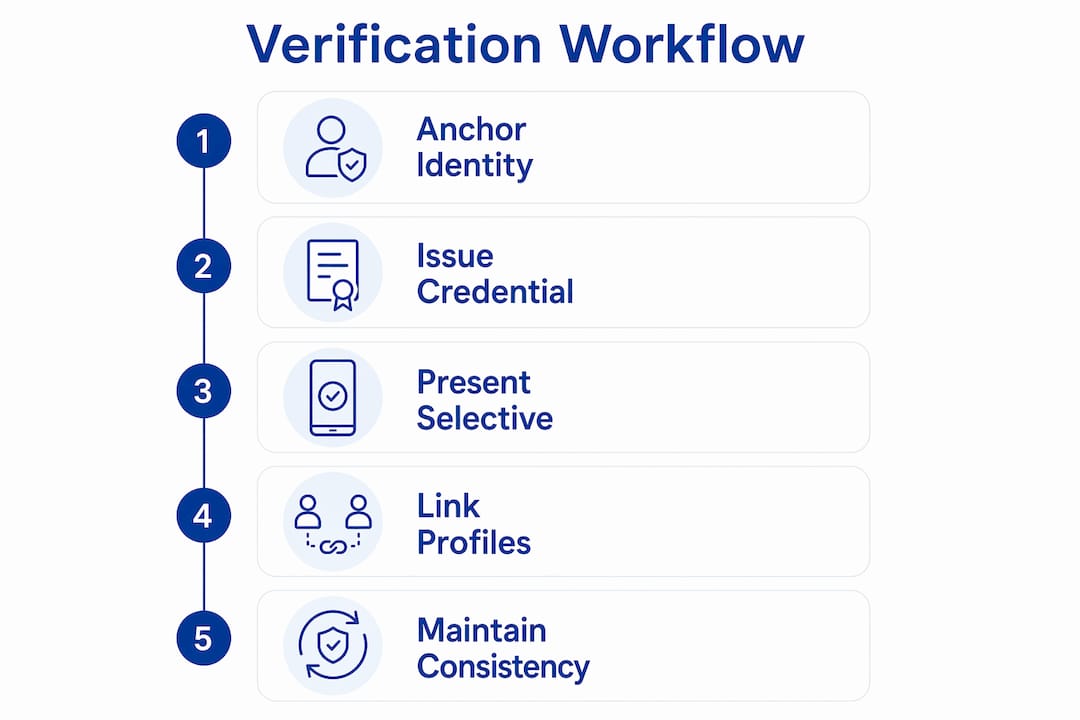
- Step-by-step workflow to verify once and reuse it
- How do you detect, document, and remove impersonation and deepfakes?
- When should you hire a specialist service?
- Key Takeaways
- The verification gap most creators never close
- Sidenty protects your identity when the stakes are real
- Useful sources
How do platforms actually verify your identity?
Every platform runs a different mix of checks, and knowing which tier you are dealing with tells you exactly what data you need to hand over, and what you can reasonably decline.
Lightweight persona checks confirm account control, not legal identity. A phone number, email address, or payment-account ownership is usually enough. These checks prove you control the account, nothing more.
Payment and KYC-level checks go further. Payout onboarding on platforms like OnlyFans or Twitch typically requires a government-issued ID scan, a selfie, and a liveness test. Liveness checks use AI and machine learning to cross-reference hundreds of identity signals and confirm you are physically present, not a photo or video replay. For the highest assurance, NFC passport chip reads using the ICAO 9303 standard are significantly harder to spoof than a standard selfie-and-scan combination.
Progressive verification is increasingly common. Many providers offer no-code widgets that escalate evidence requests only when risk signals require it, so you are not uploading your passport every time you log in.
What to ask platforms about data retention: How long do they store your document images? Can you request deletion after verification? These questions matter because a document stored on a third-party server is a document at risk.
Can you verify once and reuse that trust across services?
Yes, and the W3C Verifiable Credentials standard is the clearest path to making that real. A Verifiable Credential is a cryptographically signed digital document issued by a trusted party (a payment processor, a verified service, or an identity provider) and stored in a digital wallet on your device. When a platform asks you to verify, you present only the specific attribute it needs, such as “verified human” or “age over 18,” without handing over the underlying document.
Chrome and other browsers now ship the Digital Credentials API with support for same-device and cross-device credential presentation. Apple’s Safari and WebKit added support for the same standard in 2025, using the ISO 18013-5 mdoc format. The result is a genuinely cross-platform flow: you store your credential once and present it from any supported browser or device.
Trade-offs at a glance:
| Dimension | Verifiable Credentials / Digital Credentials API | Traditional document upload |
|---|---|---|
| Portability | High — reusable across any supporting platform | None — re-upload required each time |
| Privacy | Selective disclosure; share attributes, not raw docs | Full document exposed to each platform |
| Platform adoption | Growing; not yet universal | Universal today |
| Developer friction | Moderate setup required | Low for platforms, high privacy cost for you |
| Revocation | Credential can be revoked by issuer | No revocation mechanism |
When a platform does not support Verifiable Credentials yet, fall back to these options:
- Publish a signed verification statement on your canonical domain.
- Post a pinned proof post on each platform linking back to that domain.
- Use reciprocal profile linking: each account bio links to your canonical anchor, and the anchor lists every linked account.
A canonical identity anchor is the most durable low-tech trust signal available to creators right now. It costs nothing and works on every platform.
How do you prove what platforms need without exposing raw documents?
The core principle is simple: share attributes, not documents. Instead of uploading your driver’s license to five different platforms, you prove the attribute each platform actually needs.
Privacy-preserving options you can request or use today:
- Attribute-only proofs. Ask whether the platform accepts an “age over 18” or “verified human” claim from a trusted issuer rather than a full ID scan.
- Zero-knowledge proofs. These let you mathematically prove a statement (e.g., “I am over 18”) without revealing the underlying data. Adoption is still limited on consumer platforms, but it is the direction the industry is heading.
- Hardware-backed credentials. Device-bound wallets store credentials in secure hardware (like a phone’s Secure Enclave), so the credential cannot be copied or transferred to another device.
- Domain-owned anchors. A signed statement published on a domain you control is a public, verifiable proof of account ownership that avoids repeated document sharing entirely.
Pro Tip: Prefer cryptographically signed, short-lived attribute proofs over broad document uploads whenever a platform gives you the choice. A credential that expires in 90 days and proves only “verified adult” is far safer than a stored passport scan.
The Digital Credentials API adds phishing resistance on top of selective disclosure: because the credential presentation is handled by the browser and the device’s secure hardware, a fake site cannot intercept or replay your credential. That is a meaningful protection for creators who are frequent targets of phishing. For a fuller picture of the privacy risks creators face, the exposure goes well beyond document uploads.
Step-by-step workflow to verify once and reuse it
This workflow gets you from zero to a portable, privacy-preserving verified identity in under a week.
Step 1 (Days 0–3): Establish your canonical anchor
Register a personal domain or designate one primary profile as your identity hub. Publish a verification statement listing every platform account you own. Harden access with a hardware security key (WebAuthn/FIDO2) or a passkey. This single step reduces impersonation fragility across all your accounts immediately.

Step 2 (Days 1–7): Issue a portable credential
Choose an issuer. Stripe Identity offers free starter verifications, making it a practical starting point for most creators. Complete the minimum required verification (ID scan plus liveness check), then store the resulting credential in a compatible digital wallet. Collect only the evidence the issuer requires; do not volunteer extra documents.
Step 3 (Ongoing): Present attributes, link back, stay consistent
Present selective attributes to each platform rather than re-uploading documents. Link every platform bio back to your canonical anchor. Keep your username and profile image consistent across accounts so followers and platforms can confirm you are the same person.
Cost overview:
| Route | Typical cost | Best for |
|---|---|---|
| Self-issued signed statement + domain anchor | Free | Low-risk persona verification |
| Tiered IDV (e.g., Stripe Identity) | Free tier available; paid tiers after | Payout onboarding, KYC-level checks |
| Specialist legal-backed verification | Varies by provider | High-stakes cases, legal escalation |
How do you detect, document, and remove impersonation and deepfakes?
Detection comes first. Watch for sudden new accounts using your name or likeness, spikes in follower reports, and visual artifacts in video content (unnatural blinking, edge distortion, audio-lip sync mismatches). Run reverse-image searches on your profile photos regularly. Dedicated deepfake detection and prevention habits catch most impersonation attempts early.
Evidence preservation checklist:
- Copy the full URL of every infringing page or post.
- Take full-resolution screenshots with visible timestamps.
- Record metadata: date discovered, platform, account handle, follower count.
- Use a browser extension or tool that captures page source alongside the screenshot.
- Write a signed chain-of-custody note: who found it, when, and how it was preserved.
Removal and escalation steps:
- File a platform abuse report using the platform’s own reporting tool. Include your evidence package.
- Submit a DMCA takedown notice to the platform’s designated copyright agent. Name the infringing URLs, your original work, and your contact information.
- If the content appears in Google search results, file a Google copyright removal request to delist the URLs.
- Send a preservation letter to the platform’s legal team if you anticipate litigation. This prevents them from deleting evidence you may need.
- Escalate to a specialist service or law enforcement when the impersonation is coordinated, persistent, or involves financial fraud.
Understanding the full range of digital identity theft tactics helps you recognize escalation patterns before they spiral.
When should you hire a specialist service?
DIY takedowns work for isolated incidents. Hire a specialist when the situation crosses any of these lines:
- Infringing content has spread across multiple platforms simultaneously.
- A coordinated network of fake accounts is impersonating you.
- Deepfake content is being used to damage your reputation or solicit money from your audience.
- Platform reports have gone unanswered for more than 72 hours.
- You need forensic documentation to support a legal claim or law enforcement referral.
A specialist service should deliver: cross-platform takedown coordination, DMCA filings, forensic evidence documentation, hosting-provider complaints, and legal coordination if an injunction is needed. Sidenty reports a 99.8% content removal rate across its cases, which reflects both the volume of takedowns handled and the legal infrastructure behind them.
While the specialist is working, you should:
- Preserve all evidence independently (do not rely solely on the specialist’s copies).
- Change your passwords and enable two-factor authentication on every linked account.
- Notify your platform trust and safety teams directly, not just through public reporting tools.
- Avoid publicly confronting the impersonator, which can amplify reach.
The commercial damage from impersonation extends well beyond reputation. Brand deals, sponsorships, and platform monetization can all be affected when a fake account is convincing enough to mislead partners.
Key Takeaways
Creators who verify once, anchor their identity to a canonical source, and share only required attributes face dramatically less exposure than those who re-upload documents to every platform on demand.
| Point | Details |
|---|---|
| Verify once, reuse everywhere | Issue a W3C Verifiable Credential and present selective attributes to each platform instead of re-uploading documents. |
| Build a canonical anchor first | A personal domain or designated profile that all accounts link to is the most durable, low-cost trust signal available. |
| Verification can be completed in as little as 10 seconds | Professional IDV services like Stripe Identity can confirm identities in as little as 10 seconds, and some offer free starter verifications. |
| Share attributes, not raw documents | Use the Digital Credentials API or attribute-only proofs to prove age or human status without exposing your ID. |
| Sidenty for specialist escalation | When impersonation spreads across platforms or deepfakes appear, Sidenty’s 99.8% removal rate reflects a legal-backed response capability. |
The verification gap most creators never close
The part of this that rarely gets said plainly: most creators who get impersonated were not careless. They just never had a reason to think about their identity as something that needed a formal structure until the day a fake account started messaging their audience or a deepfake appeared on a site they had never heard of. That gut punch is real, and the helplessness that follows it is real too.
What a privacy-first verification strategy actually does is close the gap between “I exist on these platforms” and “I can prove I exist on these platforms.” The canonical anchor, the portable credential, the evidence template — none of these are complicated. They are just steps most creators skip because nothing has gone wrong yet. The creators who take those steps before a crisis hits are the ones who can respond in hours instead of weeks.
Balance matters too. You do not need to share your passport with every platform that asks. Simple steps, like a signed domain statement and consistent profile linking, prevent the majority of impersonation attempts without requiring you to hand over sensitive documents at all.
Sidenty protects your identity when the stakes are real
When impersonation or deepfakes go beyond what platform reporting tools can handle, Sidenty provides direct, specialist support for content creators. The service covers cross-platform identity protection, deepfake removal, DMCA takedowns, forensic evidence documentation, and legal coordination — all under one roof.
Sidenty’s 99.8% content removal rate is the result of combining legal expertise with platform-specific takedown workflows built specifically for creators on OnlyFans, Twitch, and similar services. After your initial contact, Sidenty conducts an incident assessment to scope the damage, identify all infringing content, and outline a removal timeline. For creators dealing with an active incident right now, the fastest path forward is to start with Sidenty’s creator protection services and get an assessment underway today.
Useful sources
- Digital Credentials API (Chrome for Developers) — Primary technical reference for selective disclosure, same-device and cross-device credential presentation, and browser implementation details.
- Stripe Identity — Documentation on tiered IDV pricing, liveness checks, and the free-starter-verification model referenced in the workflow section.
- Socure Verify — Details on AI and machine learning-driven identity verification, liveness checks, and multi-source data triangulation.
- Cross-Platform Profile Verification Guide (verify.top) — Practical guidance on canonical anchors, signed statements, and chain-of-authenticity methods for creators.
- Identigate Identity Verification — Technical background on NFC passport chip reads (ICAO 9303) and high-assurance verification methods.
- Plaid Identity Verification — Reference for progressive verification flows, no-code widgets, and low-friction onboarding patterns.
- Poyverify — Reusable Digital Identity — Industry commentary on portable trust layers and the case for one-time verification reused across platforms.
- AI consent layer definition (AI Twin) — Background on consent layers and data-sharing models relevant to privacy-preserving verification flows.