
Google copyright removal is the formal process by which rights holders request that Google delist URLs containing unauthorized copies of their work from search results, using the Digital Millennium Copyright Act as the legal foundation. The DMCA, enacted by the U.S. Congress in 1998, gives copyright owners a direct mechanism to report copyright violations across Google Search, Google Images, Google Shopping, and YouTube. If your original content is showing up somewhere it shouldn’t, this process puts the power back in your hands. Understanding how the DMCA works is the first step every creator needs to take before filing anything.
What do you need before filing a Google copyright removal request?
Preparation determines whether your request succeeds or gets rejected. Google reviews each submission manually, and incomplete or vague requests are denied without appeal. Having everything ready before you open the form saves time and avoids frustrating delays.
Required documentation checklist:
- Proof of ownership. This means your original file, creation date, registration number from the U.S. Copyright Office, or a signed contract confirming you hold the rights.
- The original URL. The direct link to where your legitimate content lives online, such as your website, portfolio, or official platform page.
- The infringing URL. The exact URL where the stolen content appears in Google’s index. Vague descriptions are not accepted. Google requires specific links.
- Your contact information. Full legal name, mailing address, email address, and phone number. If you are filing on behalf of a company, you need written authorization to act as their agent.
- A Google account. You must be signed in to submit a request through Google’s copyright removal form.
| Item | Why it matters |
|---|---|
| Original content URL | Proves your work existed before the infringing copy |
| Infringing content URL | Tells Google exactly what to delist |
| Proof of ownership | Establishes your legal standing to file |
| Agent authorization | Required if filing on behalf of another rights holder |
| Contact details | Google and the alleged infringer may need to reach you |
Pro Tip: Use a professional email address tied to your brand or legal name. Requests filed from generic or anonymous accounts raise credibility concerns and can slow processing.
How to file a Google copyright removal notice step-by-step
The official Google copyright removal form lives at Google’s Legal Troubleshooter, accessible through support.google.com. The form routes you to the correct submission path depending on which Google product is involved. Follow these steps exactly.
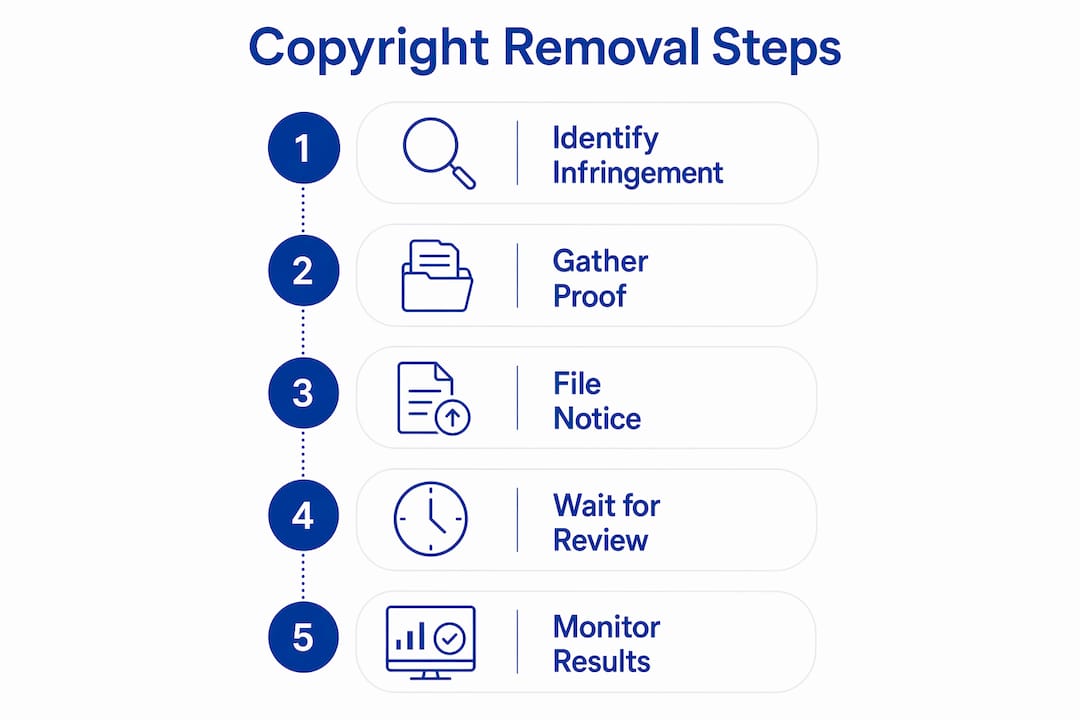
Go to Google’s copyright removal form. Search “Google copyright removal” and select the Legal Troubleshooter link. Choose the product where the infringement appears, such as Google Search or YouTube.
Select your role. Identify yourself as the copyright owner or an authorized representative. If you represent a company, have your authorization letter ready.
Describe the copyrighted work. Be specific. State the type of work (photograph, video, written article, music track), the title, and where the original is published. Vague descriptions cause rejection.
Enter the original and infringing URLs. Google requires specific URLs and does not accept file uploads. Paste each URL on a separate line. Double-check every link before submitting.
Write the good-faith statement. You must declare that you believe the use of the content is not authorized by the copyright owner, its agent, or the law. This statement carries legal weight. Do not file if you are uncertain about your ownership.
Sign and certify. Type your full legal name as your electronic signature. This certifies, under penalty of perjury, that the information is accurate and that you are the rights holder or authorized agent.
Submit and document. Save a copy of your submission confirmation. Google typically sends an email acknowledgment within a few days.
After submission, Google publishes all approved DMCA removal requests in its public Transparency Report. Google also notifies the alleged infringer, who then has the right to file a counter-notice. That transparency is intentional. It keeps the process fair, but it also means the person who stole your content will know you filed.
YouTube is a separate path. For YouTube videos, the process routes through YouTube’s copyright management tools rather than the standard Google Search form. YouTube also offers Content ID, a system that automatically detects copyrighted audio and video. Content ID claims differ from formal removal requests. Claims often shift monetization rather than remove the video outright, while formal removal requests result in strikes and video takedowns.
Pro Tip: Screenshot the infringing page and save the URL before filing. Infringers sometimes delete content after receiving Google’s notification, and your documentation protects you if the dispute escalates.

How do you handle disputes and counter-notifications?
A counter-notice is the infringer’s legal response to your removal request. Understanding what happens next keeps you calm and prepared.
When someone files a counter-notice, Google restores the delisted URL within 10–14 business days unless you take legal action in that window. Claimants have 30 days to respond to disputes on YouTube. Failure to respond within that window causes the claim to release automatically. That automatic release is actually a useful fact: many bad actors simply ignore the process and the claim resolves itself.
Common mistakes to avoid during disputes:
- Filing a counter-notice without solid legal grounds. A false counter-notice carries the same perjury risk as a false takedown.
- Ignoring the dispute entirely. Silence is not a safe option. Respond within the required window.
- Re-uploading the original video to “fix” the issue. Re-uploading destroys view velocity and SEO metadata, costing you rankings and engagement you built over time.
- Accepting a Content ID claim without reviewing it. Accepting means forfeiting any revenue the video generates.
For YouTube specifically, YouTube Studio’s cloud editor lets you trim or replace the infringing segment without re-uploading. This preserves your views, comments, and URL. It is the cleanest resolution path when the claim is legitimate but limited to a short clip.
“Most counter-notifications do not escalate to lawsuits. Valid counter-notices typically prompt claimants to drop claims, easing the burden on creators significantly.”
If you are the rights holder and someone files a counter-notice against your legitimate takedown, consult a copyright attorney. You have a narrow window to file a federal lawsuit before Google restores the content. Most infringers back down when they realize a real legal response is coming.
What are the limits of Google copyright removal?
A DMCA takedown for Google Search removes infringing URLs from search results. It does not delete the content from the hosting server. This distinction matters more than most creators realize.
Google removal equals visibility reduction, not total deletion. The infringing file still exists on the web. Anyone with a direct link can still access it. Other search engines like Bing index it independently and require separate takedown requests. The content stays live until you contact the hosting provider directly.
To find the hosting provider, run a WHOIS lookup on the infringing domain using a tool like ICANN’s WHOIS database. The result shows the registrar and often the hosting company. File a separate DMCA notice directly with that host. Major hosts like GoDaddy, Shopify, and Cloudflare each have their own DMCA submission forms. You can also file a takedown on X/Twitter if the content is shared there.
| Removal target | What it achieves | What it does not do |
|---|---|---|
| Google Search | Delists URL from Google results | Does not remove content from server |
| Hosting provider | Removes content from the server | Does not affect other search engines |
| Platform (YouTube, etc.) | Removes or restricts the specific upload | Does not affect copies on other platforms |
Pro Tip: After filing with Google, immediately send a DMCA notice to the hosting provider. Doing both in parallel cuts total removal time significantly and closes the gap that direct links exploit.
If the infringer ignores hosting provider notices or the content reappears repeatedly, legal action becomes the next step. A copyright attorney can send a cease-and-desist letter or file a federal lawsuit under 17 U.S.C. § 501. Persistent infringement, especially of commercial content, often warrants that escalation.
Key Takeaways
Google copyright removal delists infringing URLs from search results, but full content protection requires separate DMCA notices to the hosting provider and any relevant platform.
| Point | Details |
|---|---|
| Prepare before filing | Gather original URLs, infringing URLs, and proof of ownership before opening the form. |
| File with precision | Vague descriptions and missing URLs cause rejection; specificity is the single biggest success factor. |
| Google removal is partial | Delisting from search does not delete content from servers; contact the host separately. |
| Use platform tools first | YouTube Studio’s editor resolves many claims without re-uploading and preserves SEO metrics. |
| Disputes rarely escalate | Valid counter-notices prompt most claimants to drop claims within the 30-day response window. |
What working with copyright removal taught us at Sidenty
The most common reason creators lose copyright disputes is not weak legal standing. It is sloppy paperwork. A mistyped URL, a vague content description, or a missing authorization letter can sink an otherwise airtight claim. Google’s review team does not give second chances on the first submission. Accuracy is not optional.
The second lesson is about platform tools. Creators instinctively want to re-upload a clean version of their video when a claim hits. That instinct is wrong. Re-uploading wipes out years of SEO equity and audience signals. The YouTube Studio editor exists precisely to avoid that loss. Use it.
The third thing we have seen repeatedly: creators panic during counter-notifications. The counter-notice process feels threatening, but most counter-notices do not lead to lawsuits. If your rights are legitimate and your original filing was accurate, stay the course. Respond within the required window, document everything, and consult legal counsel if the stakes are high.
Proactive monitoring beats reactive filing every time. Set up Google Alerts for your content titles, watermark your files, and register key works with the U.S. Copyright Office. Registration gives you access to statutory damages, which is a far stronger legal position than unregistered copyright. The creators who protect their work most effectively are the ones who treat monitoring as a weekly habit, not a crisis response.
— Sidenty
Sidenty’s copyright protection services for creators
Discovering your content has been stolen and indexed by Google is a gut punch. Filing takedowns, tracking hosting providers, and managing counter-notices across multiple platforms is a full-time job on top of your actual creative work.

Sidenty handles the entire copyright infringement removal process for creators, from filing DMCA notices with Google and hosting providers to monitoring for new violations. With a 99.8% success rate in content removal, Sidenty’s team of legal experts manages every step so you can focus on creating. Whether you need anti-piracy enforcement for recurring violations or full-spectrum creator content protection, Sidenty builds a removal strategy around your specific situation. Visit Sidenty to protect your content today.
FAQ
What is Google copyright removal?
Google copyright removal is the DMCA-based process that lets rights holders request Google delist specific URLs containing unauthorized copies of their work from search results.
How long does a Google DMCA takedown take?
Google typically processes removal requests within a few days to a few weeks, depending on request volume and the completeness of your submission.
Does Google copyright removal delete the infringing content?
No. Google removal only delists the URL from search results. The content remains on the hosting server until you file a separate notice with the hosting provider.
What happens if someone files a counter-notice against my takedown?
Google notifies you and restores the URL within 10–14 business days unless you file a federal lawsuit. Most claimants drop the case when a valid counter-notice is filed.
Can I remove a copyright claim on YouTube without re-uploading?
Yes. YouTube Studio’s built-in editor lets you trim or replace claimed audio without re-uploading, preserving your video’s views, comments, and search ranking.