
Digital content audit security is the systematic review of your digital assets, platforms, and online identity to identify vulnerabilities before they become violations. For content creators, influencers, and digital professionals, this process is the difference between owning your brand and losing it to unauthorized access, content theft, or identity compromise. A proper content security audit covers SSL/TLS certificates, multi-factor authentication (MFA), Content Security Policy (CSP) headers, and third-party integration risks. Your digital identity protection depends on treating this not as a one-time task, but as a recurring practice built into how you operate online.
What does a digital content audit security process require?
Before you run a single scan, you need a clear picture of what you are protecting. Start by inventorying every digital asset you own: social media accounts, content platforms like OnlyFans or Twitch, website domains, cloud storage, and any third-party tools connected to your brand. Missing even one integration can leave a gap that bad actors exploit.
Defining your audit scope matters as much as the tools you use. A security risk assessment for digital content platforms should model content flows, third-party SaaS vendors, and user identity at scale, with controls prioritized by business continuity and compliance needs. That means you are not just scanning for bugs. You are mapping every path an attacker could take to reach your content or impersonate you.

The right tools make the process faster and more thorough. Here is what a solid toolkit looks like:
| Tool type | Function | Example |
|---|---|---|
| Vulnerability scanner | Detects misconfigurations and exposed files | OWASP ZAP |
| CSP evaluator | Identifies risky policy directives | CSP Evaluator (Google) |
| Exposure checker | Finds leaked config files in seconds | Automated CLI scanners |
| Header analyzer | Validates HSTS, X-Frame-Options, and CSP | HTTP header analysis tools |
| Log aggregator | Centralizes access and error logs | SIEM platforms |
Pro Tip: Set your audit goals in writing before you open any tool. Knowing whether you are auditing for compliance, content theft prevention, or account takeover risk will shape every decision you make.
How to conduct a step-by-step content security audit
A foundational security audit should cover at least 25 checkpoints, including SSL/TLS, MFA enforcement, exposed configuration file checks, and third-party SDK auditing. That number sounds large, but the process breaks down into six clear steps.
Step 1: Validate your SSL/TLS certificates and HTTPS configuration.
Every platform or website you control should serve content over HTTPS with a valid, unexpired certificate. Check that your certificate covers all subdomains and that HTTP traffic redirects automatically to HTTPS. An expired or misconfigured certificate signals to both users and search engines that your site is unsafe.
Step 2: Audit user accounts and enforce MFA.
Pull a full list of every account with access to your platforms, content management systems, and cloud storage. Revoke access for anyone who no longer needs it. Enforce MFA on every admin account without exception. Credential reuse is one of the most common entry points for account takeovers, and MFA blocks the majority of automated attacks.
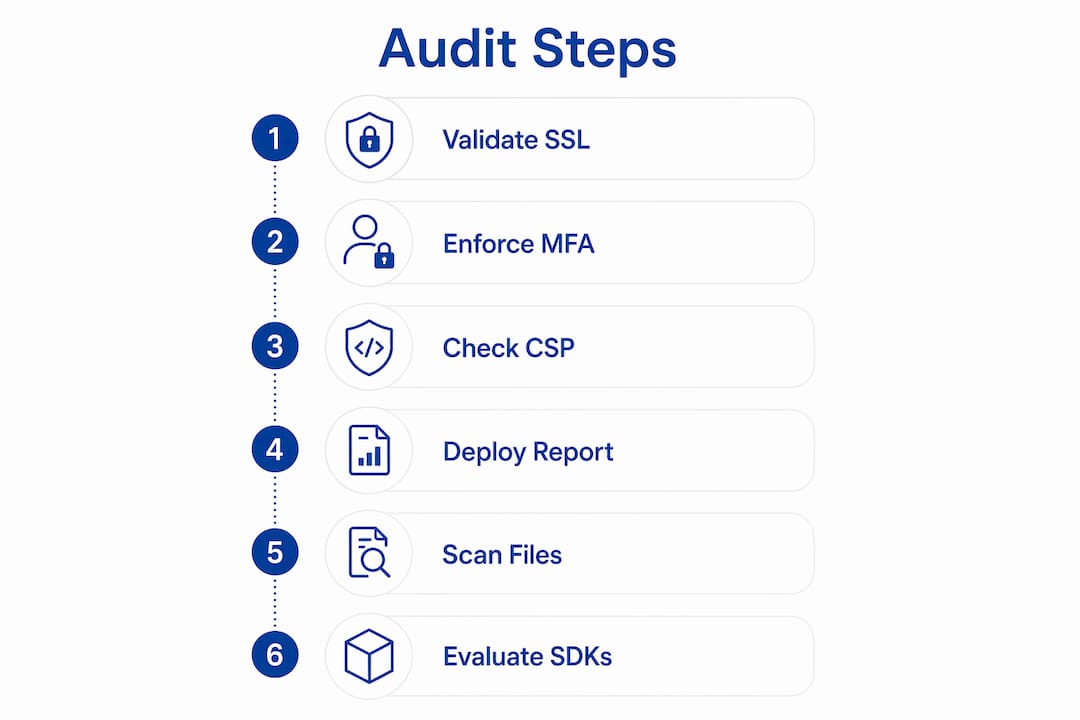
Step 3: Assess your Content Security Policy.
Security professionals recommend automated CSP validation to identify risky directives like ‘unsafe-inline’ and confirm that security headers such as HSTS carry a minimum max-age of 15,768,000 seconds (roughly six months). Run your CSP through a static evaluator first to catch syntax errors and obvious policy gaps.
Step 4: Deploy CSP in report-only mode before full enforcement.
Deploying CSP in report-only mode for one to two weeks before full enforcement helps you identify real violations and false positives without breaking your site. This phased approach is the standard recommendation for creators who cannot afford downtime on revenue-generating platforms.
Step 5: Scan for exposed sensitive files and misconfigurations.
Automated exposure checkers detect critical file leaks in under 30 seconds. Run these scans against your domain to find exposed .env files, database credentials, or backup archives that should never be publicly accessible. A single exposed configuration file can hand an attacker full access to your backend.
Step 6: Evaluate third-party SDKs and API integrations.
Every plugin, analytics script, or payment integration you add to your platform is a potential attack surface. Review each one for known vulnerabilities, check whether the vendor has issued recent security updates, and remove any integration you no longer actively use.
Pro Tip: Manual business logic testing catches what automated scanners miss. Test whether a logged-out user can access premium content, whether account roles can be escalated through URL manipulation, and whether your platform leaks user data in API responses.
What vulnerabilities do content audits typically uncover?
Content audits consistently surface the same categories of risk. Knowing them in advance helps you prioritize your remediation work.
- Weak CSP directives. The ‘unsafe-inline’ directive in a CSP allows Cross-Site Scripting (XSS) attacks, where malicious scripts execute in a visitor’s browser. This is one of the most common findings in creator website audits.
- Exposed configuration files. A publicly accessible .env file contains database passwords, API keys, and secret tokens. Attackers scan for these files automatically, and finding one gives them full control of your backend.
- Third-party SDK risks. Plugins and embedded scripts from external vendors can introduce vulnerabilities you did not create and cannot directly patch. Audit every integration and remove unused ones.
- Credential reuse and weak passwords. Reused passwords across platforms mean a breach on one service compromises all others. Password managers and unique credentials per platform are non-negotiable.
- Stale accounts and over-permissioned users. Former collaborators, contractors, or agency accounts left with active access are a silent risk. Quarterly reviews catch these before they become incidents.
Defense-in-depth is not a buzzword. It is the only architecture that works. Defense-in-depth strategies for digital assets require multi-device approval quorums and cryptographic sharding, with architectures commonly involving 3 to 4 independent security layers per high-value transaction. For creators managing valuable intellectual property or monetized content libraries, layering controls means no single failure point exposes everything you have built.
For high-value digital assets, hardware-isolated environments ensure private keys used for digital asset signing never appear in plain text in memory, significantly reducing memory-scraping risks. This standard applies equally to creators managing licensing keys, encrypted content vaults, or NFT-linked assets. Sidenty’s advanced anti-piracy solutions incorporate cryptographic sharding techniques that align with these defense-in-depth principles.
How do you maintain security after the audit is complete?
Completing an audit is not the finish line. The threats against your content and identity evolve constantly, and your defenses need to keep pace.
- Schedule recurring audits on a calendar. Quarterly audit schedules prevent unauthorized access long before major incidents occur. Set a recurring calendar event and treat it with the same priority as a content publishing deadline.
- Monitor CSP violations in real time. Static CSP evaluators highlight syntax errors but cannot replace real-time monitoring of live environments. Set up a CSP reporting endpoint to collect violation reports from browsers and review them weekly.
- Set up alerting for suspicious activity. Configure alerts for failed login attempts, unusual geographic access, and bulk content downloads. Log aggregation tools centralize these signals so you can spot patterns before they escalate.
- Review third-party integrations quarterly. Services you connected six months ago may have changed ownership, introduced new data-sharing terms, or published unpatched vulnerabilities. A quarterly review keeps your integration list clean.
- Train yourself and your team on social engineering. Phishing attacks targeting creators often impersonate platform support teams or brand partners. Recognizing the signs of a social engineering attempt is a skill that no technical control can fully replace.
Pro Tip: Track two KPIs after every audit cycle: mean time to remediate critical findings, and the percentage of identified issues resolved within 30 days. These numbers tell you whether your security practice is improving or stagnating.
Security is programmatic, not just technical. Even well-configured systems can fail due to small logic errors, which is why continuous monitoring beyond initial audits is a requirement, not an option. Your content creator privacy checklist should include a monitoring review at every quarterly cycle.
Key Takeaways
A thorough digital content audit security process, repeated on a quarterly schedule, is the most reliable way to protect your online identity and content from unauthorized access, theft, and exploitation.
| Point | Details |
|---|---|
| Inventory before you scan | Map every account, platform, and integration before running any security tool. |
| CSP phased deployment | Run report-only mode for 1–2 weeks before enforcing your Content Security Policy. |
| MFA on every admin account | Multi-factor authentication blocks the majority of automated account takeover attempts. |
| Defense-in-depth for assets | Layer 3 to 4 independent controls for any high-value content or digital asset. |
| Quarterly audit cadence | Scheduled recurring audits catch stale accounts and third-party risks before incidents occur. |
Why most creators audit once and pay for it twice
Working with creators and digital professionals at Sidenty, I see the same pattern repeat. A creator runs one audit after a scare, fixes the obvious issues, and then treats the work as done. Six months later, a new third-party plugin introduces a vulnerability, a former collaborator’s account is compromised, or a CSP directive quietly breaks after a platform update. The audit was real. The follow-through was not.
The uncomfortable truth is that a one-time audit gives you a snapshot of your security posture on a single day. Your threat environment changes every week. New SDKs ship with undisclosed bugs. Platforms update their authentication flows. Attackers shift tactics. A static snapshot does not protect a dynamic target.
I also see creators resist manual testing because it feels slower than running an automated scanner. That instinct is understandable but costly. Manual review of business logic is as critical as automated vulnerability scanning to find real risks. Automated tools catch known patterns. Manual testing catches the logic flaws specific to your platform, your content structure, and your audience permissions.
The creators who stay protected are the ones who treat security as a rhythm, not a reaction. They schedule audits, review their monitoring dashboards, and update their access lists without waiting for something to go wrong. That discipline is harder to build than any technical control, and it is the one that makes the biggest difference.
— Sidenty
How Sidenty supports your digital content security
Protecting your content and identity requires more than a checklist. It requires expertise, consistent monitoring, and the ability to act fast when something goes wrong.
Sidenty works directly with creators and digital professionals to assess their security posture, remove unauthorized content, and prevent deepfakes from damaging their reputation. With a 99.8% success rate in content removal, Sidenty combines legal expertise with technical protection to cover every layer of your digital identity. Whether you need a full creator identity protection review or ongoing monitoring against content theft, Sidenty’s team is ready to help you move from reactive to protected.
FAQ
What is digital content audit security?
Digital content audit security is the systematic review of your digital assets, accounts, and platform configurations to identify and fix vulnerabilities that could expose your content or compromise your identity.
How often should creators run a content security audit?
Quarterly audit schedules are the most effective cadence for detecting stale accounts and third-party integration risks before they cause unauthorized access incidents.
What is a Content Security Policy and why does it matter?
A Content Security Policy (CSP) is an HTTP header that controls which scripts and resources a browser can load on your site. Weak CSP directives like ‘unsafe-inline’ leave your platform open to Cross-Site Scripting attacks.
Can automated tools replace manual security testing?
No. Static security evaluators catch syntax errors and known misconfigurations, but manual testing is required to find business logic flaws, privilege escalation paths, and content-specific vulnerabilities that scanners cannot detect.
What is the biggest security risk for content creators specifically?
Credential reuse across platforms and stale third-party integrations are the two most common entry points for account takeovers and content theft targeting creators and digital professionals.